
MD.ai Reporting
Dictate, structure and sign radiology reports faster with AI
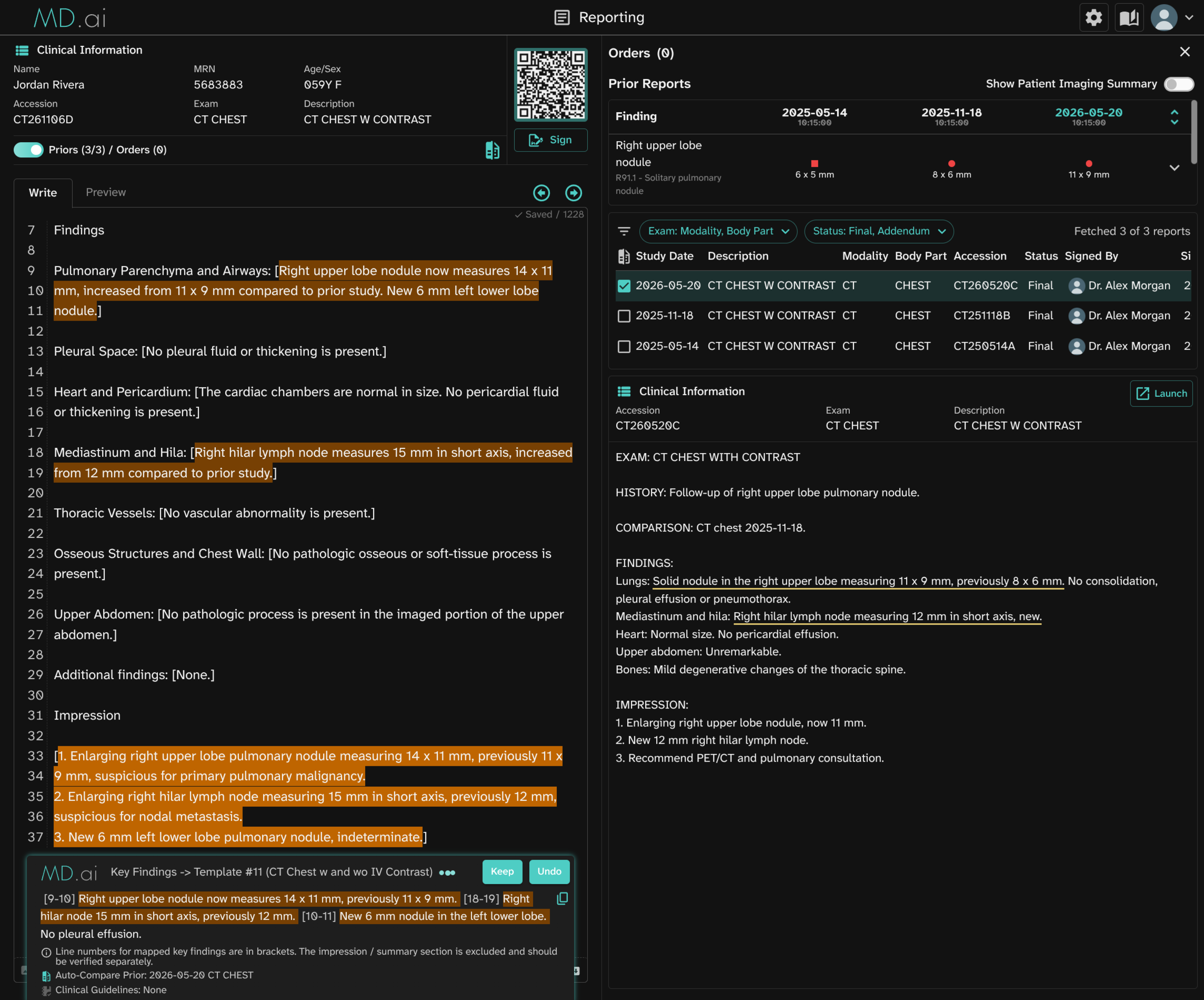
MD.ai Reporting is a web-based radiology reporting app. You dictate findings, AI maps them into a structured template and drafts the impression, and you review, edit and sign. It opens from your PACS, RIS or viewer, so each report starts with the study's clinical information already filled in.
Get started
Quickstart
Write and sign your first report in a few minutes.
Workspace overview
Find your way around the editor, panels and menus.
Report with AI
Turn dictated key findings into a structured report.
Set up a site
Configure users, templates and report formatting as a site admin.
Key concepts
| Concept | What it is |
|---|---|
| Report | One report for one study (or several linked orders). It moves from Draft to Final, and can gain Addenda. |
| Clinical information | The study's details, such as patient, accession, exam and reason for exam, sent by your PACS or RIS when it opens the report. |
| Key findings | The findings you dictate in your own words. AI maps them into the right sections of a template. |
| Template | A report skeleton with [ ] fields and picklists. Yours, or shared by your site. See Templates and macros. |
| Macro | A snippet of text you insert by saying its name. |
| Clinical guideline | Reference criteria, such as a classification system, that AI follows when it writes the impression. |
| Site | Your organization in MD.ai Reporting. A site can have several locations, each with its own settings, users and templates. |
| Prelim | A preliminary report written by one user, such as a resident, for a reviewer to finalize. See Prelim reports. |
Roles
| Role | Can |
|---|---|
| User | Write, sign and addend reports; take over a colleague's unsigned draft; manage a personal library of templates, macros and guidelines. |
| Site admin | Everything a user can, plus site administration: users, settings, layout, shared templates and macros, prelim workflows, HL7 messages and usage. |
| Prelim user | Send reports as prelims for review. Assigned by a site admin. |
| Prelim reviewer | Review, edit and sign prelims. Assigned by a site admin. |
What you can do
- Dictate in 18 languages and regional variants, with a SpeechMike or PowerMic, your computer's microphone, or your phone.
- Report with AI: map dictated key findings into the best template, compare with prior reports, and generate the impression.
- Use templates and macros with fields and picklists, by voice or by click.
- Pull in measurements from screenshots, PDFs, DICOM SR and AI results.
- Sign and addend reports, with optional billing codes, email copies and your signature.
- Collaborate through prelim workflows, draft takeover and sync across devices.
- Export and share reports as PDF, Word or RTF, or a share link.
Integrate MD.ai Reporting
To launch MD.ai Reporting from your PACS, RIS or web app, see the Integration Guide and the Report Generation API. To get set up, contact us.