
Chat with AI
Ask questions about a report and bring answers back into it
Chat lets you ask a HIPAA-compliant language model about the report you're writing, such as a differential diagnosis, a follow-up recommendation or a guideline, and add the answer to your report.
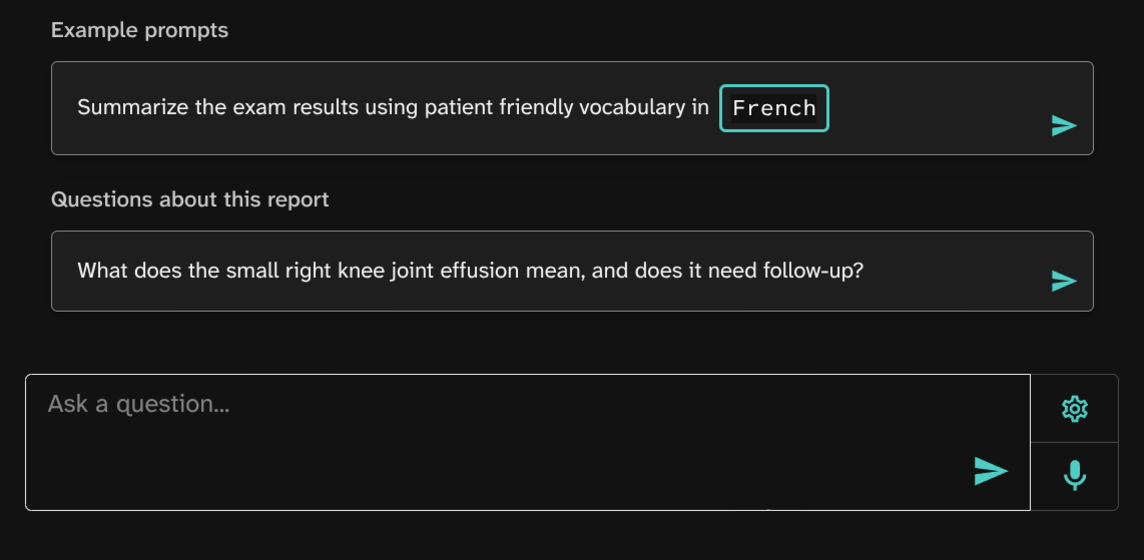
Open chat
- In reports opened from your PACS or RIS, turn on Chat in Launched Reports in User Settings to show chat beside the report.
- In the full web app, New Chat in the side navigation starts a conversation, and My Chats lists past ones.
When chat is open beside a report opened from your PACS or RIS, the report is included as context, so you can ask "What follow-up does this nodule need?" without pasting anything. To get started, click Suggest questions about this report, or one of the example prompts.
Use an answer
Click the export button on an answer. With a report open, the button is Append Message to the Active Report and adds the answer to the end of your report. Otherwise, it's Export Message to a New Report and starts a new report with it. The button isn't shown when the open report is already signed.
To append the latest answer from the keyboard, press Ctrl+Shift+,.
Model
Chat uses a HIPAA-compliant model. Click the gear next to the message box to see it under Active LLM, and use Reasoning to trade speed for more thorough answers. These choices don't affect the AI that builds your reports.