
Prelim Workflows
Set up prelim groups for residents, assistants and transcriptionists, and who reviews their reports
A prelim workflow lets some users, such as residents, send reports as prelims for others, such as attendings, to review and sign. You set it up in Site Prelim with prelim groups.
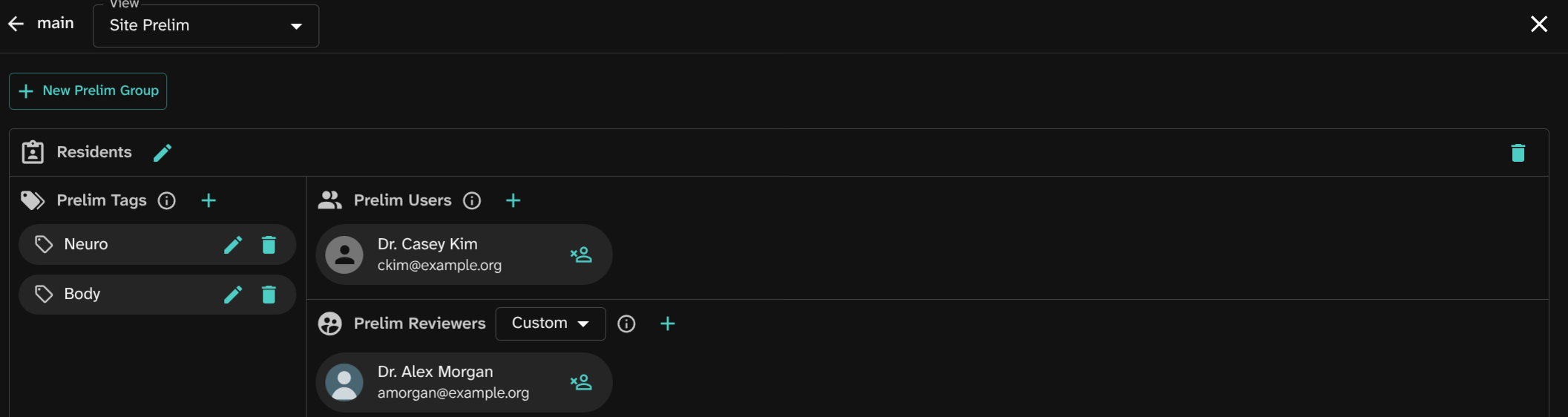
Each group has:
| Part | What it is |
|---|---|
| Prelim Users | Who can send reports as prelims, such as residents. |
| Prelim Tags | Labels prelim users choose when they send a prelim, such as "Neuro" or "Stat". Reviewers filter by tag. |
| Prelim Reviewers | Who reviews and signs the group's prelims. |
Create a prelim group
Add a group
Click New Prelim Group. Rename it with Rename Prelim Group, for example "Residents".
Add tags
Add at least one prelim tag. The group isn't available to users until it has one.
Add prelim users
Add the site users who will send prelims. They'll see Prelim next to Sign.
Choose reviewers
Under Prelim Reviewers, choose how reviewers are assigned:
| Option | Reviewers |
|---|---|
| Custom | The users you add with Add Prelim Reviewer. The default for a new group. |
| All site users except prelim users | Everyone at the site except this group's prelim users, as of when you choose this option. It updates when the group's prelim users change, but users added to the site later aren't included. To include them, switch to Custom and back; prelims that reviewers have open return to their authors. |
| Prelim users in group [group] | The prelim users of another group. Use this for multi-level review, such as junior residents reviewed by senior residents. |
Reviewers see Prelim Reports in the side navigation.
Change or remove a group
- Rename, add or remove tags, users and reviewers at any time.
- Removing a reviewer gives the prelims they had taken back to their authors, still as prelims.
- Deleting a tag returns its unreviewed prelims to their authors as drafts.
- Delete Prelim Group removes the group and its tags and users. Groups that used it for their reviewers switch to Custom.
To find prelims and who has them, use Site Reports; it shows Prelim Tag, Prelim By and Reviewed By once your site has a prelim group.