
Site Administration
Manage your site's users, settings, layout, shared library and workflows
Site admins manage how MD.ai Reporting works for everyone at their site. Site administration is in the full web app, not in reports opened from your PACS or RIS: open MD.ai Reporting in your browser, and if you're a site admin, Site Admin appears at the top of the side navigation.
Open Site Admin
Click Site Admin, then choose a site, or one of its locations. Filter the list by site ID or description. To switch sites later, click the site ID at the top left.
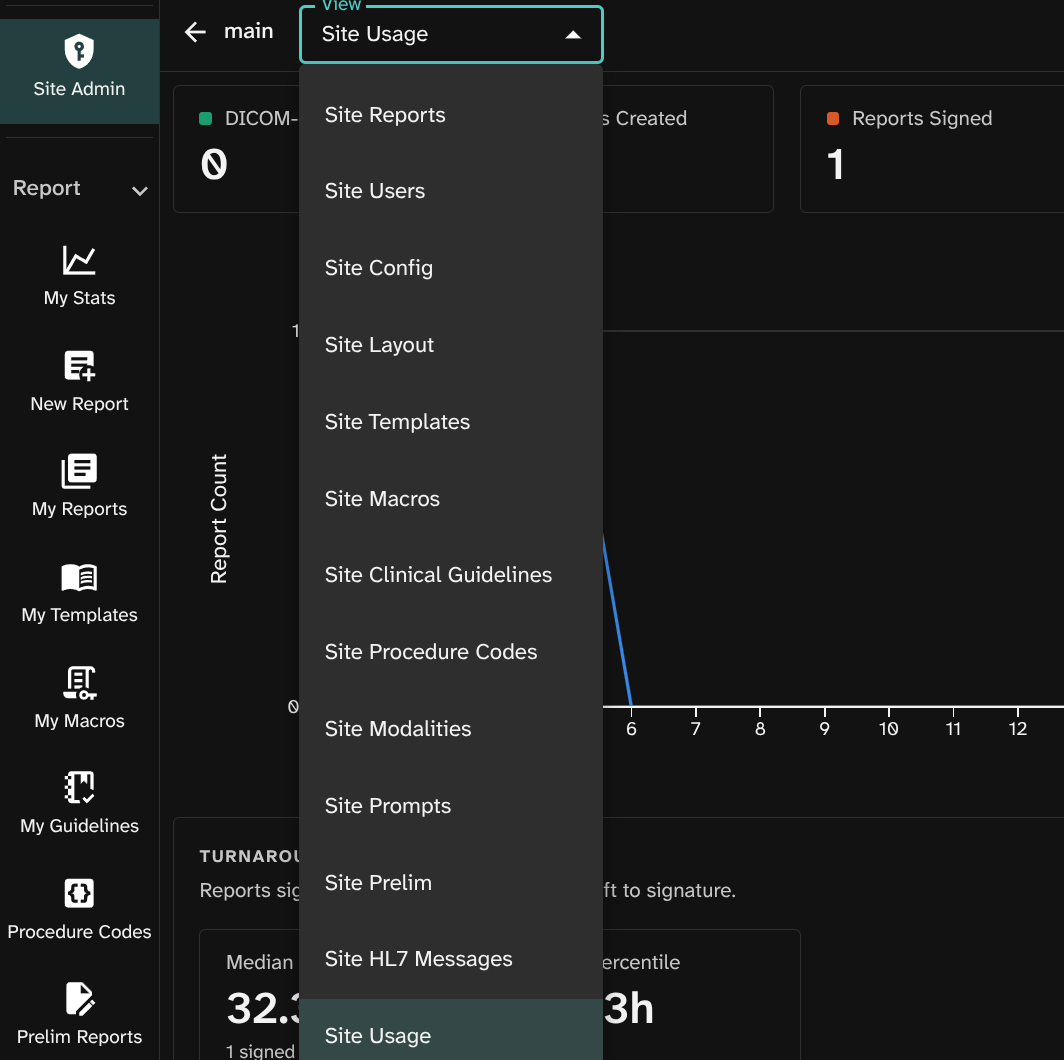
Switch between views with the View menu at the top. On very wide screens, the views are tabs instead.
Sites and locations
A site can have several locations, such as hospitals or imaging centers. Each location has its own users, settings, layout, library and prelim groups. Choose one from the Location menu at the top; the default location is marked [Default]. With a location chosen, views are labeled Location Users, Location Config and so on, and show "These settings are configured separately for each location."
Site Reports, Site HL7 Messages and Site Usage cover the whole site. In Site Reports and Site Usage, choose All Site Locations, or one location, to filter them. Site HL7 Messages always shows the whole site; the Location menu doesn't filter it.
What you can manage
| View | What it's for |
|---|---|
| Site Reports | Find, preview, reset or delete any report at the site. See Reports, HL7 and usage. |
| Site Users | Add users and admins. See Users. |
| Site Config | Access, signing, sharing, dates and the exported report format. See Site settings. |
| Site Layout | Show or hide parts of the reporting interface. See Layout. |
| Site Templates, Site Macros, Site Clinical Guidelines, Site Procedure Codes, Site Modalities | The library shared with everyone at the site. See Shared library. |
| Site Prompts | Example questions for chat on shared reports. See Shared library. |
| Site Prelim | Prelim groups, tags, users and reviewers. See Prelim workflows. |
| Site HL7 Messages | Reports sent to your RIS, and retrying failures. See Reports, HL7 and usage. |
| Site Usage | Reporting volume and activity, with CSV export. See Reports, HL7 and usage. |
Set up a new site
MD.ai creates your site and its first site admins when your integration is set up. From there:
- Add users, or let users be added automatically when they first open a report.
- Review Site settings: signing, access and your report's PDF format.
- Import your templates and macros.
- Hide anything your radiologists won't use in Layout.
- If you have residents or transcriptionists, set up prelim workflows.