
Import Annotations
Load model results, labels from other tools, or metadata into a project
1. Create MD.ai Client
We can use the mdai python client to quickly import a list of annotations into a project. For example, we may wish to load the output results of a machine learning model as annotations, or populate project metadata labels with report or clinical data.
Create a client as described in Getting Started, with an access token.
import mdai

DOMAIN = 'public.md.ai'
ACCESS_TOKEN = 'YOUR_ACCESS_TOKEN'
mdai_client = mdai.Client(domain=DOMAIN, access_token=ACCESS_TOKEN)
You need the project ID and dataset ID, which are shown in the annotator's Info panel. Annotations are imported into one dataset at a time.
Example IDs:
project_id = "LxR6zdR2"
dataset_id = 'D_vBnWb1'
2. Create labels
If you are not importing to previously created labels, you'll need to create them in the UI and then get label IDs:
- In the annotator, choose
Label Controls>Show label ID, then copy the label IDs - or download annotation JSON file and extract label dataframe using library and create a dictionary of labelnames and IDs
Example
# Replace with your filename
JSON = 'mdai_public_project_MwBe19Br_annotations_labelgroup_all_2020-09-23-214038.json'
results = mdai.common_utils.json_to_dataframe(JSON)
# Labels
labels_df = results['labels']
# Label dictionary
labels = dict(zip(labels_df.labelName, labels_df.labelId))
3. Choose correct format
Annotations format
The annotations variable must be a list of dictionaries with the set of required fields dependent on the different label types. All annotations must contain a corresponding labelId.
- For exam-scoped labels,
StudyInstanceUIDis required. - For series-scoped labels,
SeriesInstanceUIDis required. - For image-scoped labels,
SOPInstanceUIDis required. - A
notefield can be added to any annotation. - A
valuefield, a number such as a score, can be added to annotations of labels set to record a number. It must meet the label's rules (integer, minimum, maximum); an annotation with an invalid value is not imported and is reported as failed. - For local image-level labels, an additional field
datais required, with the format ofdataspecified based on the example below. - For image-scope labels or local image-level labels for the specific frame of multi-frame data,
frameNumber(0-indexed) is required. - For image-scope labels for video data,
SeriesInstanceUIDandframeNumber(0-indexed) is required. - For series-scope labels for video data,
datais optional. Omit it and the annotation covers the whole video; includestartFrameNumberandendFrameNumber(both 0-indexed and within the video) to narrow it to a frame interval.
Pick the format that matches the annotations you are importing and convert your data to create a list of dictionaries.
Exam label
{
  'labelId': 'L_jZRPN2',
  'StudyInstanceUID': '1.2.276.0.7230010.3.1.2.8323329.19529.1513659878.548505',
  'note': 'This is an annotation note that can be imported as well',
  'value': 87  # only for labels set to record a number
}
Series label
{
  'labelId': 'L_nZYWNg',
  'SeriesInstanceUID': '1.2.276.0.7230010.3.1.3.8323329.19529.1513659878.548504'
}
Image label (global label)
{
  'labelId': 'L_3EMmEY',
  'SOPInstanceUID': '1.2.276.0.7230010.3.1.4.8323329.19529.1513659878.548506'
}
Multi-Frame (global label)
{
  'labelId': 'L_3EMmEY',
  'SOPInstanceUID': '1.2.276.0.7230010.3.1.4.8323329.19529.1513659878.548506',
  'frameNumber': 0,
}
Video (global label)
Applies to the whole video:
{
  'labelId': 'L_3EMmEY',
  'SeriesInstanceUID': '1.2.276.0.7230010.3.1.4.8323329.19529.1513659878.548506'
}
Narrowed to frames 0 through 100:
{
  'labelId': 'L_3EMmEY',
  'SeriesInstanceUID': '1.2.276.0.7230010.3.1.4.8323329.19529.1513659878.548506',
  'data': { 'startFrameNumber': 0, 'endFrameNumber': 100 }
}
Bounding box
{
  'labelId': 'L_xZgpEM',
  'SOPInstanceUID': '1.2.276.0.7230010.3.1.4.8323329.25053.1513659982.870619',
  'data': {'x': 200, 'y': 200, 'width': 200, 'height': 400},
  'note': 'Any label can have a note'
}
Polygon, freeform, or line
{
  'labelId': 'L_nEK9AV',
  'SOPInstanceUID': '1.2.276.0.7230010.3.1.4.8323329.14861.1513659866.150292',
  'data': {'vertices': [[300,300],[500,500],[600,700],[200,800]]},
  'note': 'Optional note'
}
Mask
Convert the mask numpy_arr to data for import by using the library funcion convert_mask_data
 {
  'labelId': 'L_nEK9AV',
  'SOPInstanceUID': '1.2.276.0.7230010.3.1.4.8323329.14861.1513659866.150292',
  'data': mdai.common_utils.convert_mask_data(numpy_arr),
  'note': 'Optional note'
}
Location
{
  'labelId': 'L_BA3JN0',
  'SOPInstanceUID': '1.2.276.0.7230010.3.1.4.8323329.2010.1513660008.830854',
  'data': {'x': 400, 'y': 400}
}
Example annotation list for bounding box
# List of annotation dictionaries
annotations = [
 {
    'labelId': 'L_xZgpEM',
    'SOPInstanceUID': '1.2.276.0.7230010.3.1.4.8323329.25053.1513659982.870619',
    'data': {'x': 200, 'y': 200, 'width': 200, 'height': 400},
    'note': 'Optional note'
  },
  {
    'labelId': 'L_eUwwYf',
    'SOPInstanceUID': '1.2.276.0.7230010.3.1.4.8323329.25053.1513659982.870720',
    'data': {'x': 34, 'y': 45, 'width': 120, 'height': 352}
  },

  # ...

  {
    'labelId': 'L_xZgpEM',
    'SOPInstanceUID': '1.2.276.0.7230010.3.1.4.8323329.25053.1513659982.871892',
    'data': {'x': 233, 'y': 144, 'width': 26, 'height': 38}
  }
]
Import the annotations array you just created
mdai_client.import_annotations(annotations, project_id, dataset_id)Example output:
Importing 8 annotations into project LxR6zdR2, dataset D_vBnWb1...
Successfully imported 8 / 8 annotations into project LxR6zdR2, dataset D_vBnWb1.
Overall import errors will be printed to the console. However, even with a successful import, there may be errors with importing individual annotations: these are returned as a list.
failed_annotations = mdai_client.import_annotations(annotations, project_id, dataset_id)
print(failed_annotations)
# [{'index': 0, 'reason': 'Invalid labelId L_zzzzzz'}, {'index': 1, 'reason': 'Invalid labelId L_zzzzzz'}]
Metadata
Metadata labels are imported the same way. First create the labels in the Metadata label group. Put the information in note.
metadata_annotations = [
  # metadata label (exam-scoped)
  {
    'labelId': 'L_7E5pMZ',
    'StudyInstanceUID': '1.2.276.0.7230010.3.1.2.8323329.19529.1513659878.548505',
    'note': 'Lorem ipsum dolor sit amet, consectetur adipiscing elit, sed do eiusmod tempor incididunt ut labore et dolore magna aliqua. Enim sed faucibus turpis in eu ipsum suspendisse ultrices gravida. Praesent elementum facilisis leo vel. Donec enim diam vulputate ut pharetra sit. Vel pretium lectus quam id leo in vitae '
  },
  # metadata label (series-scoped)
  {
    'labelId': 'L_pEnelZ',
    'SeriesInstanceUID': '1.2.276.0.7230010.3.1.3.8323329.19529.1513659878.548504',
    'note': 'Information to be imported'
  },
  # metadata label (image-scoped)
  {
    'labelId': 'L_yZBWwE',
    'SOPInstanceUID': '1.2.276.0.7230010.3.1.4.8323329.19529.1513659878.548506',
    'note': 'Information to be imported'
  },
  # list of additional annotations to import
  # ...
]
Import the metadata annotations
mdai_client.import_annotations(metadata_annotations, project_id, dataset_id)Example output:
Importing 3 annotations into project LxR6zdR2, dataset D_vBnWb1...
Successfully imported 3 / 3 annotations into project LxR6zdR2, dataset D_vBnWb1.
Sublabels / child annotations
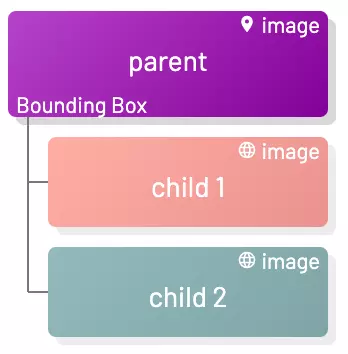
To import annotations for labels with sublabels, we can specify the sublabels using the children field. Each item in children should follow the appropriate format of its label type (see "Annotation format" section above). Ensure the specified DICOM resource UIDs match up with the label scopes.
The labelId of the children must be sublabels. In the following example, L_rEGG7E and L_mEzplA are sublabels of the label L_5AJeMN.
annotations = [
  {
    'labelId': 'L_5AJeMN',
    'SOPInstanceUID': '1.2.276.0.7230010.3.1.4.8323329.31185.1513659797.320640',
    'data': {'x': 200, 'y': 200, 'width': 200, 'height': 400},
    'children': [
      {
        'labelId': 'L_rEGG7E',
        'SOPInstanceUID': '1.2.276.0.7230010.3.1.4.8323329.31185.1513659797.320640',
      },
      {
        'labelId': 'L_mEzplA',
        'SOPInstanceUID': '1.2.276.0.7230010.3.1.4.8323329.31185.1513659797.320640',
      },
    ]
  },
  # list of additional annotations to import
  # ...
]
Preserving original users / timestamps
Optionally, for each annotation, createdById / updatedById / createdAt / updatedAt may be included. For example, one may wish to import exported annotations from another project into a new project, while preserving the original user and timestamp information. For this to work properly, the specified createdById / updatedById must also be project users of the target project.
By default, when createdById / updatedById are not specified, the new annotations will be associated with the importing user.
Example:
annotations = [
  {
    'labelId': 'L_3EMGXA',
    'StudyInstanceUID': '1.2.276.0.7230010.3.1.2.8323329.5420.1513659928.902121',
    'createdById': 'U_eMzVMx',
    'updatedById': 'U_eMzVMx',
    'createdAt': '2023-09-20T01:27:44.016Z',
    'updatedAt': '2023-09-20T01:27:44.026Z',
  }
]
4. Import function
mdai_client.import_annotations(annotations, project_id, dataset_id)Example output:
Importing 3 annotations into project LxR6zdR2, dataset D_vBnWb1...
Successfully imported 3 / 3 annotations into project LxR6zdR2, dataset D_vBnWb1.
Large imports are split into chunks of 100,000 annotations automatically. Change the size with chunk_size.
(Optional) Import DICOM SR as annotations
import_sr() imports DICOM structured reports (SR) as annotations. For each exam an SR references, it creates an annotation with the given label, with the SR's content as text in the note. Use an exam-scoped global label, such as a metadata label. The project, dataset and label IDs are all required.
Example:
import mdai

mdai_client = mdai.Client(domain='public.md.ai', access_token='YOUR_ACCESS_TOKEN')

dataset_id = 'D_0Z4qeN'
project_id = 'L1NpnQBv'
label_id = 'L_QnlPAg'

from glob import glob
sr_files = glob("/path/to/dicom-sr/files/*.dcm")

mdai_client.import_sr(sr_files,
            dataset_id=dataset_id,
            project_id=project_id,
label_id=label_id)Importing 15 annotations into project L1NpnQBv, dataset D_0Z4qeN...
Successfully imported 15 / 15 annotations into project L1NpnQBv, dataset D_0Z4qeN.Export/Import notebook
This linked notebook gives examples for using the mdai library in order to:
- download annotations from your project
- turn the exported JSON file into a spreadsheet-like dataframe
- import/upload data or outside model predictions back into your project
You'll need to supply the specifics for your project, but the template in the notebook will get you started